



Anya Core System Control Avatar
Your Lovable Anya

Elevate your Discord — flawless music, cute automations

Anya is a Discord music bot that lets your community play music from Spotify playlists, YouTube searches, SoundCloud, and more. It includes audio filters, autoplay, playlists, server dashboard, greetings, announcements, and premium features for larger communities.

Growing Discord Music Bot

Anya is expanding every day to deliver rich audio fidelity, high-capacity streaming nodes, and simple server configuration tools.

1747
Servers Live
1200+
Active Listeners
25K+
Songs Played (Last Week)

Anya's Core Features

Everything you need to play music and customize your Discord server.

Custom Playlists

Create, save, and manage your personal music playlists directly from the dashboard.

Auto Cloud Sync

Playlists are saved to your account so you can load them in any server.

Lag-Free Music

Smart buffering keeps music playing clearly even if your Discord connection lags.

Lag Protection

Pre-buffers audio so music keeps playing smoothly even if your connection lag spikes.

Spotify Playback

Paste Spotify track, album, or playlist links, and Anya will play them instantly.

Spotify Support

Matches Spotify links with high-quality audio streams in less than a second.

SoundCloud & Files

Play music from SoundCloud, Bandcamp, or by uploading files directly to Discord.

Multiple Sources

Play directly from SoundCloud, Bandcamp, or by uploading files to Discord.

Fast Song Loading

Anya remembers popular songs to start playing them instantly without search delays.

Instant Playback Cache

Remembers popular songs to start playing them instantly without search delays.

Dashboard Control

Change player buttons, embed styles, and options directly from the web dashboard.

Interactive Controls

Change player buttons, embed styles, and options directly from the web dashboard.

Anya's Music Features

A clean, simple breakdown of how Anya delivers high-quality music to your Discord server.

Saved Music Playlists

Save your favorite songs in custom playlists so you can play them anytime.

What it is: A simple way to save your music queues to your account. Instead of losing your song list when the bot leaves the channel, you can load your saved playlists instantly.

How to use: You can create and edit playlists directly through our web dashboard or by using Discord commands. Free users can save up to 100 songs in their playlist.

Custom Cloud Playlist Mockup

Lag-Free Music Playback

Anya automatically prevents stuttering and lag, even if Discord's servers are slow.

What it is: Our playback system keeps a small buffer of the song loaded ahead of time. If your Discord server connection drops momentarily, the music keeps playing without any gaps.

How to use: This is fully automatic. You do not need to configure anything. The bot monitors connection quality in real-time to keep your audio clear.

Play Spotify Links Directly

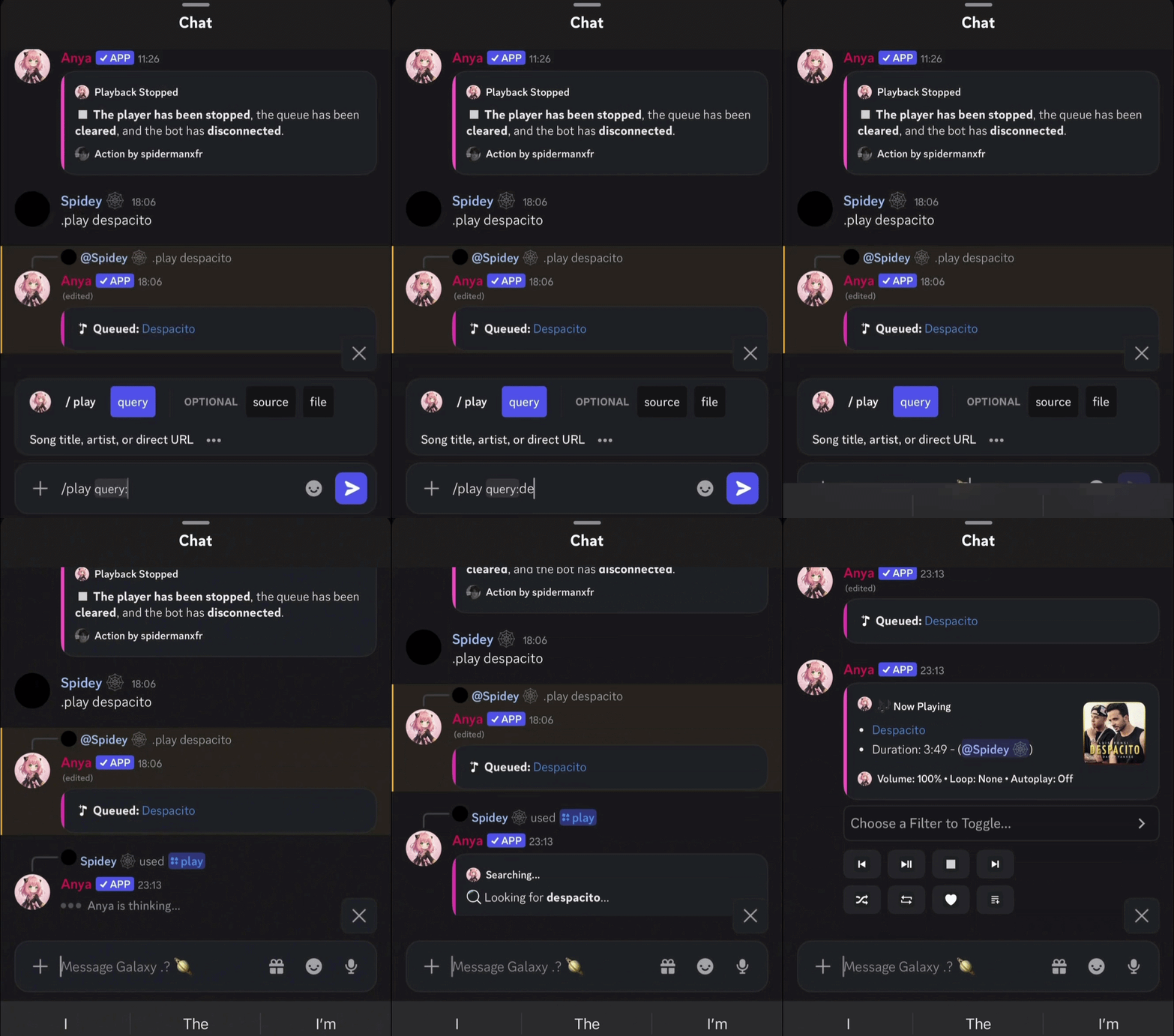
Simply paste Spotify track, album, or playlist links, and Anya will play them instantly.

What it is: Anya reads the song names from your Spotify links and matches them with high-quality audio streams. This happens in less than a second.

How to use: Copy a Spotify URL and use the /play command in Discord. Playlists with up to 100 tracks will load smoothly and play in order.

Support for SoundCloud & Files

Stream music from SoundCloud, Bandcamp, or by uploading audio files directly to Discord.

What it is: Anya supports playing music from platforms other than YouTube. You can even upload an mp3 or wav file directly in Discord, and the bot will play it.

How to use: Paste any SoundCloud link or drag-and-drop an audio file into the Discord chat when using the play command.

Fast Song Loading

Anya remembers popular songs to load and start playing them almost instantly.

What it is: To avoid searching for the same popular tracks repeatedly, Anya stores secure links to frequently played songs. This reduces loading times by more than half.

How to use: The next time you request a trending song, it will start playing in less than half a second.

Easy Dashboard Settings

Customize how the bot works in your server using a clean dashboard.

What it is: A web-based control panel where you can toggle bot features, change embed colors, and configure who is allowed to control the music.

How to use: Log in with your Discord account, select your server, and customize settings using simple buttons and sliders.

Ready in Three Steps

From zero to music in under 60 seconds.

1
Invite Anya

Click the add button, pick your server, and grant the required permissions.

2
Configure

Set up greeting messages, music channels, and XP rewards from the dashboard.

3
Enjoy

Sit back as Anya takes care of music, moderation, and engagement.

Vouched by Elite Server Operators

Real structural feedback from top guild owners in production environments.

Charvi
Charvii
Verified Owner

“Anya's premium nodes never drop bitrates. The automated playlists setup completely changed our onboarding style.”

Pari
Pari
Community Admin

“The control dashboard layout is extremely fast and friendly. Setting up Spotify integration took seconds flat.”

Rdx
Rdx Jod
Core Moderator

“The smart cache engine is absolutely incredible. Commands fire instantly and music starts before I can even blink.”

Go Premium, Unlock More

Higher bitrate audio, priority support, custom branding, and exclusive features for your community.

320kbps Audio
Priority Support
Custom Branding
Early Features
Explore Premium

Latest Broadcasts & Updates

Stay updated with critical development patch notes and music infrastructure upgrades.

View All Logs
Story Time Anya Dev Story Part 1
May 20, 2026 3 min read
Anya's Journey: How Anya Started

Anya started as a private project between two close friends so they could listen to songs together in voice channels without interruptions.

Read Full Log
Story Time Anya Dev Story Part 2
May 22, 2026 3 min read
Growing Anya: The 75+ Server Growth

Discover how Anya went public, the story behind our first 75 servers, getting verified by Discord, and the tiny team that kept the dream alive.

Read Full Log
Compliance Anya Dev Story Part 3
May 25, 2026 3 min read
The Verification Fight & Gateway Intents

Behind the scenes of navigating developer verification in India, dealing with identity verification hurdles, and fighting for Gateway Intents.

Read Full Log

Popular Commands

Just a few of the 100+ commands Anya brings to your server.

/play
Play a track
/skip
Skip current
/pause
Pause music
/queue
View queue
/filter
Add effects
/stats
Server stats

Stream From Every Major Platform

Seamless high-fidelity playback from all your favorite sources. No configuration needed.

Spotify
YouTube
SoundCloud
Bandcamp
Direct URLs

Frequently Asked Questions

How do I invite Anya to my Discord server?

Click the 'Add to Discord' button on the homepage, log in with your Discord account, select your server, and grant the required permissions (Connect, Speak, Send Messages).

Why is the bot not playing music in my voice channel?

Make sure the bot has 'Connect' and 'Speak' permissions in that specific voice channel's channel overrides. Also, ensure that a music node is connected and you have started playback using /play.

Can I use Spotify playlists with Anya?

Yes! You can copy any public Spotify playlist, track, or album link and paste it into the `/play` command query option. Anya will resolve and play it in less than a second.

How do I create and manage my custom playlists?

You can create playlists using the `/playlist create` command or directly through the web dashboard panel. You can then add tracks using `/playlist add` or play your playlist using `/playlist play`.

What features are included in Anya Premium?

Anya Premium unlocks 320kbps high-quality audio, unlimited custom playlists (up to 5), 24/7 voice channel stay mode, advanced audio filters (like Bassboost and Nightcore), and custom player controller layouts.

How does 24/7 mode work?

When 24/7 mode is enabled using the `/247` command (or via dashboard), Anya will remain in the voice channel even when all users leave, so the bot is always ready to play music instantly.

Is my user data secure with Anya?

Yes, we only store essential settings like your user ID, saved playlists, and server preferences. No personal information or voice activity is ever recorded or shared.

Where can I get help if the bot goes offline?

If you experience any issues, join our official Discord Support Server using the link at the bottom of the page. Our support staff is available 24/7 to help you troubleshoot.

How can I set up a custom prefix for Anya?

You can set a custom prefix directly on the web dashboard panel under 'Server Settings', or use the `/config prefix` command in your server.

Does Anya support Apple Music or YouTube links?

Yes! Anya supports YouTube links, SoundCloud, Bandcamp, and raw attachment files. Apple Music links are also resolved similarly to Spotify.

How do I use the audio filters like Bassboost and Nightcore?

You can apply filters using slash commands like `/filter bassboost` or `/filter nightcore`. You can also click the filters dropdown menu directly on the Now Playing embed card.

What are the requirements to host a Custom Bot?

There are no hardware requirements on your end. Our Custom Bot tier is fully hosted on our high-capacity server nodes and configured via panel.anyabot.pro.

How do I configure the DJ role permissions?

Navigate to the web dashboard panel, select your server, and set a specific role as the DJ role. Only users with this role will be able to skip or modify music settings.

What payment options are supported for Premium?

We support major credit/debit cards, UPI, and local wallets processed securely through Razorpay.

Can I transfer my Premium subscription to another server?

Yes, you can manage and reassign your active Premium slots to any server you own via the 'Profile' section on the web dashboard.

Why does the bot disconnect after a song ends?

By default, the bot leaves the channel when the queue ends to save resources. If you want it to stay permanently, enable 24/7 mode using `/247`.

How do I adjust the default volume for my server?

Use the `/volume` command, or select your server on the dashboard and set the 'Default Playback Volume' slider to your preferred level.

How does the autoplay system work?

When autoplay is active, Anya automatically queries Last.fm to find and play similar songs when your queue runs empty, keeping the music playing continuously.

Is there a limit on how many tracks can be in the queue?

Free users can queue up to 100 songs at a time. Premium users enjoy an unlimited queue size for long listening sessions.

How can I find the lyrics of the currently playing song?

Type the `/lyrics` command in your Discord channel, and Anya will search and return the full lyrics of the currently playing track.

Does Anya support slash commands?

Yes, Anya is fully optimized for Discord's slash commands system. Type `/` in your chat box to view the full list of available music and utility commands.

What should I do if the bot is laggy or stuttering?

Check if the bot's region matches your voice channel, or try changing the Discord voice channel region. You can also re-join the channel to establish a fresh connection.

How do I reset my server configurations to default?

In the web dashboard under your server settings, click the reset options to wipe custom prefixes, language selections, and player preferences.

Can I invite multiple instances of Anya to one server?

Each server can host one instance of the main Anya bot. If you need multiple music bots playing in different voice channels simultaneously, check out our Custom Bot plans.

How do I cancel my Premium subscription?

You can cancel or manage your subscriptions at any time via the billing area in the dashboard under your Profile settings.

Meet the Team behind Anya

The developers and community managers keeping the music playing.

Spidey

Spidey

Lead Developer & Owner

Developer Spidey handles the core voice connections, bot logic, and system architecture to keep music lag-free.

Charuu

Charuu

Co-Owner

Charuu oversees operations, server management, and coordinates updates to ensure high quality.

The Manager

The Manager

Secret Member

The Manager operates behind the scenes, ensuring infrastructure support and community growth.

Loading... members online

Join the Anya Community 💜

Get support, suggest features, get early access to updates, and connect with thousands of Anya users worldwide.

Join Our Server
24/7 Support
Early Updates
Giveaways
Active Community