



Anya Core System Control Avatar
أنيا المحبوبة لديك

ارتقِ بخادمك في Discord — موسيقى مثالية وأتمتة لطيفة

استمتع ببث صوتي عالي الدقة مع قواعد ترحيب فائقة السرعة على الخادم. بارامترات تسجيل ممتازة للنظام مدمجة مباشرة في منصة مركزية واحدة.

موثوق به في أكثر من {count} خادم

تعالج الشبكات العامة عالية السعة الصوت بأمان. تتبدل القائمة تلقائيًا كل 3 ثوانٍ بسلاسة.

1767
الخوادم النشطة
1200+
Active Listeners
25K+
Songs Played (Last Week)

Anya متعددة الاستخدامات واللطيفة

استكشف الميزات الهيكلية القوية التي تم تكوينها لتناسب احتياجات مجتمعك.

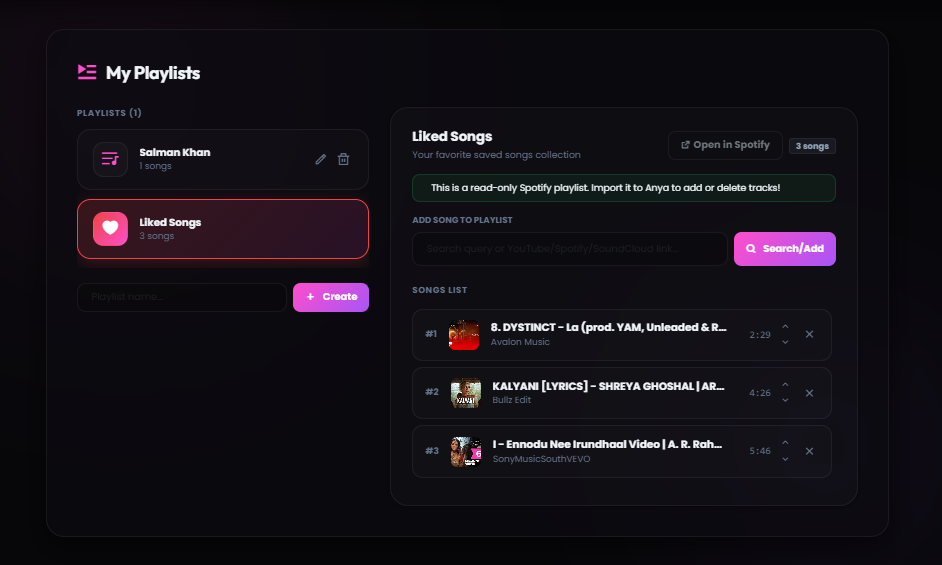
دعم قوائم التشغيل المخصصة

قم بإنشاء وحفظ وإدارة قوائم تشغيل الموسيقى المخصصة الخاصة بك محليًا داخل مزامنة لوحة التحكم السحابية.

تخزين سحابي لقائمة الانتظار

تتبعك مسارات قواعد البيانات الخاصة بك على الفور عبر مجموعات خوادم عامة مختلفة دون فقدان البارامترات أو المواقع.

حماية من زمن الاستجابة العالي

تتجاوز خوارزميات التخزين المؤقت الذكية للصوت انخفاضات الخوادم الإقليمية لضمان توصيل الصوت بسلاسة.

مصفوفة حماية التخزين

تنشر أغلفة ذكية لإعادة بناء الحزم ديناميكيًا لمنع تقطع الصوت عند حدوث تقلبات في قنوات الصوت.

تكامل تام مع Spotify

قم بتحليل روابط الملفات الشخصية المشتركة أو الألبومات أو الأغاني أو صفحات تجميع الفنانين دون أي تعارض في التنسيق.

محلل واجهة برمجة التطبيقات الفوري

يترجم الرموز الأمنية الديناميكية بسلاسة إلى مقاييس بحث عالية الدقة في أقل من 240 مللي ثانية.

دعم مصادر متعددة

قم بالبث بسهولة من SoundCloud و Bandcamp والمرفقات المباشرة ومحركات الصوت الرقمية المتعددة.

عقدة موحدة لفك التشفير

تقرأ مكتبة فك تشفير قوية الهياكل الخام بأمان عبر المنصات السحابية لتشغيل الصوت على الفور.

نظام التخزين المؤقت الذكي

يُسرّع التخزين المؤقت الذكي استجابات الأوامر وتشغيل الموسيقى مع أوقات تحميل شبه معدومة.

محرك التخزين المؤقت التنبؤي

تقوم Anya بتحميل البيانات المتكررة مسبقًا، مما يقلل زمن الوصول بنسبة تصل إلى 60% للاستجابة الفورية.

تخصيص الواجهة والخيارات

تحكم في المعلمات، وتخطيط أزرار المشغل، وقوالب ألوان التضمين مباشرة عبر لوحة التحكم.

لوحة بصرية مخصصة

قم بتغيير مظاهر الواجهة وعناصر التحكم والأذونات لتناسب نمط خادمك تمامًا وبسلاسة.

Anya's Music Features

A clean, simple breakdown of how Anya delivers high-quality music to your Discord server.

Saved Music Playlists

Save your favorite songs in custom playlists so you can play them anytime.

What it is: A simple way to save your music queues to your account. Instead of losing your song list when the bot leaves the channel, you can load your saved playlists instantly.

How to use: You can create and edit playlists directly through our web dashboard or by using Discord commands. Free users can save up to 100 songs in their playlist.

Custom Cloud Playlist Mockup

Lag-Free Music Playback

Anya automatically prevents stuttering and lag, even if Discord's servers are slow.

What it is: Our playback system keeps a small buffer of the song loaded ahead of time. If your Discord server connection drops momentarily, the music keeps playing without any gaps.

How to use: This is fully automatic. You do not need to configure anything. The bot monitors connection quality in real-time to keep your audio clear.

Play Spotify Links Directly

Simply paste Spotify track, album, or playlist links, and Anya will play them instantly.

What it is: Anya reads the song names from your Spotify links and matches them with high-quality audio streams. This happens in less than a second.

How to use: Copy a Spotify URL and use the /play command in Discord. Playlists with up to 100 tracks will load smoothly and play in order.

Support for SoundCloud & Files

Stream music from SoundCloud, Bandcamp, or by uploading audio files directly to Discord.

What it is: Anya supports playing music from platforms other than YouTube. You can even upload an mp3 or wav file directly in Discord, and the bot will play it.

How to use: Paste any SoundCloud link or drag-and-drop an audio file into the Discord chat when using the play command.

Fast Song Loading

Anya remembers popular songs to load and start playing them almost instantly.

What it is: To avoid searching for the same popular tracks repeatedly, Anya stores secure links to frequently played songs. This reduces loading times by more than half.

How to use: The next time you request a trending song, it will start playing in less than half a second.

Easy Dashboard Settings

Customize how the bot works in your server using a clean dashboard.

What it is: A web-based control panel where you can toggle bot features, change embed colors, and configure who is allowed to control the music.

How to use: Log in with your Discord account, select your server, and customize settings using simple buttons and sliders.

جاهز في ثلاث خطوات

من الصفر إلى الموسيقى في أقل من 60 ثانية.

1
ادعُ Anya

انقر على زر الإضافة، واختر خادمك، وامنح الأذونات المطلوبة.

2
التكوين

قم بإعداد رسائل الترحيب وقنوات الموسيقى ومكافآت الـ XP من لوحة التحكم.

3
استمتع

استرخِ ودع Anya تتولى الموسيقى والإشراف والتفاعل.

موصى به من قبل مشغلي الخوادم المتميزين

ملاحظات هيكلية حقيقية من أصحاب الخوادم في بيئات العمل الفعلي.

Charvi
Charvii
مالك معتمد

“لا تقلل عقد Anya المميزة من جودة البث أبدًا. غير إعداد قوائم التشغيل التلقائي أسلوبنا بالكامل.”

Pari
Pari
مشرف مجتمع

“تخطيط لوحة التحكم سريع وسهل الاستخدام للغاية. استغرق دمج Spotify ثوانٍ معدودة.”

Rdx
Rdx Jod
منسق أساسي

“محرك التخزين المؤقت الذكي لا يُصدق. يتم تنفيذ الأوامر على الفور وتبدأ الموسيقى قبل أن أطرف عين.”

اشترك في Premium، وافتح المزيد

صوت بمعدل بت أعلى، ودعم ذو أولوية، وعلامة تجارية مخصصة، وميزات حصرية لمجتمعك.

صوت 320 كيلو بت في الثانية
دعم ذو أولوية
علامة تجارية مخصصة
ميزات مبكرة
استكشف Premium

آخر التحديثات والإعلانات

ابق على اطلاع دائم بملاحظات تصحيح التطوير الهامة وترقيات البنية التحتية للموسيقى.

عرض كل السجلات
وقت القصة Anya Dev Story Part 1
May 20, 2026 3 min read
رحلة آنيا: كيف بدأت آنيا

بدأت آنيا كمشروع خاص بين صديقين مقربين حتى يتمكنا من الاستماع إلى الأغاني معًا في القنوات الصوتية دون انقطاع.

قراءة السجل الكامل

وقت القصة Anya Dev Story Part 2
May 22, 2026 3 min read
نمو آنيا: نمو أكثر من 75 خادمًا

اكتشف كيف أصبحت آنيا عامة، والقصة وراء أول 75 خادمًا لدينا، والحصول على التحقق من Discord، والفريق الصغير.

قراءة السجل الكامل
الامتثال Anya Dev Story Part 3
May 25, 2026 3 min read
معركة التحقق وبوابات العبور

كواليس التحقق من المطورين في الهند، والتعامل مع عقبات التحقق من الهوية، والقتال من أجل Gateway Intents.

قراءة السجل الكامل

أوامر شائعة

عينة من بين أكثر من 100 أمر توفره Anya لخادمك.

/play
تشغيل مسار
/skip
تخطي المسار الحالي
/pause
إيقاف الموسيقى مؤقتًا
/queue
عرض قائمة الانتظار
/filter
إضافة تأثيرات
/stats
إحصاءات الخادم

البث من كل المنصات الرئيسية

تشغيل سلس وعالي الدقة من جميع مصادرك المفضلة. لا يلزم إجراء أي تكوين.

Spotify
YouTube
SoundCloud
Bandcamp
Direct URLs

الأسئلة الشائعة

ما الذي يميز Anya عن بوتات الصوت العادية؟

تقوم Anya بتشغيل عقد خادم مخصصة عالية السعة تضمن بثًا خالٍ من التقطيع، مع معلمات ترحيب تلقائية مخصصة.

ما هي فلاتر الصوت المتاحة؟

معدلات السرعة المسبقة، وتسريع nightcore، وتضخيم الصوت الجهير العميق، ومعلمات الصدى الغامرة.

How do I add Anya to my Discord server?

Click the 'Add to Discord' button at the top of this page. You need the 'Manage Server' permission on the server you want to invite the bot to.

Is there a free tier available?

Yes, Anya offers a free tier with essential features like music playback and basic queue management. Premium unlocks advanced audio filters, custom playlists, no-prefix mode, and 400% volume boost starting at just $3/month.

Which music platforms does Anya support?

Anya supports streaming from Spotify, YouTube, SoundCloud, Bandcamp, and direct audio URLs. Simply paste a link or search by song name and the bot handles the rest.

Can I listen to music with friends in the same server?

Absolutely! Anya supports shared listening — anyone in your server can request songs, view the queue, and control playback. Premium users can also set custom DJ roles for finer access control.

Is my user data secure with Anya?

Yes, we only store essential settings like your user ID, saved playlists, and server preferences. No personal information or voice activity is ever recorded or shared.

Where can I get help if the bot goes offline?

If you experience any issues, join our official Discord Support Server using the link at the bottom of the page. Our support staff is available 24/7 to help you troubleshoot.

How can I set up a custom prefix for Anya?

You can set a custom prefix directly on the web dashboard panel under 'Server Settings', or use the `/config prefix` command in your server.

Does Anya support Apple Music or YouTube links?

Yes! Anya supports YouTube links, SoundCloud, Bandcamp, and raw attachment files. Apple Music links are also resolved similarly to Spotify.

How do I use the audio filters like Bassboost and Nightcore?

You can apply filters using slash commands like `/filter bassboost` or `/filter nightcore`. You can also click the filters dropdown menu directly on the Now Playing embed card.

What are the requirements to host a Custom Bot?

There are no hardware requirements on your end. Our Custom Bot tier is fully hosted on our high-capacity server nodes and configured via panel.anyabot.pro.

How do I configure the DJ role permissions?

Navigate to the web dashboard panel, select your server, and set a specific role as the DJ role. Only users with this role will be able to skip or modify music settings.

What payment options are supported for Premium?

We support major credit/debit cards, UPI, and local wallets processed securely through Razorpay.

Can I transfer my Premium subscription to another server?

Yes, you can manage and reassign your active Premium slots to any server you own via the 'Profile' section on the web dashboard.

Why does the bot disconnect after a song ends?

By default, the bot leaves the channel when the queue ends to save resources. If you want it to stay permanently, enable 24/7 mode using `/247`.

How do I adjust the default volume for my server?

Use the `/volume` command, or select your server on the dashboard and set the 'Default Playback Volume' slider to your preferred level.

How does the autoplay system work?

When autoplay is active, Anya automatically queries Last.fm to find and play similar songs when your queue runs empty, keeping the music playing continuously.

Is there a limit on how many tracks can be in the queue?

Free users can queue up to 100 songs at a time. Premium users enjoy an unlimited queue size for long listening sessions.

How can I find the lyrics of the currently playing song?

Type the `/lyrics` command in your Discord channel, and Anya will search and return the full lyrics of the currently playing track.

Does Anya support slash commands?

Yes, Anya is fully optimized for Discord's slash commands system. Type `/` in your chat box to view the full list of available music and utility commands.

What should I do if the bot is laggy or stuttering?

Check if the bot's region matches your voice channel, or try changing the Discord voice channel region. You can also re-join the channel to establish a fresh connection.

How do I reset my server configurations to default?

In the web dashboard under your server settings, click the reset options to wipe custom prefixes, language selections, and player preferences.

Can I invite multiple instances of Anya to one server?

Each server can host one instance of the main Anya bot. If you need multiple music bots playing in different voice channels simultaneously, check out our Custom Bot plans.

How do I cancel my Premium subscription?

You can cancel or manage your subscriptions at any time via the billing area in the dashboard under your Profile settings.

Meet the Team behind Anya

The developers and community managers keeping the music playing.

Spidey

Spidey

Lead Developer & Owner

Developer Spidey handles the core voice connections, bot logic, and system architecture to keep music lag-free.

Charuu

Charuu

Co-Owner

Charuu oversees operations, server management, and coordinates updates to ensure high quality.

The Manager

The Manager

Secret Member

The Manager operates behind the scenes, ensuring infrastructure support and community growth.

Loading... members online

Join the Anya Community 💜

Get support, suggest features, get early access to updates, and connect with thousands of Anya users worldwide.

Join Our Server
24/7 Support
Early Updates
Giveaways
Active Community