


अन्या दो करीबी दोस्तों के बीच एक निजी परियोजना के रूप में शुरू हुई ताकि वे बिना किसी रुकावट के वॉयस चैनलों में एक साथ गाने सुन सकें।
पूरा ब्लॉग पढ़ें

हाई-फिडेलिटी नोड स्ट्रीमिंग के साथ अल्ट्रा-रेस्पॉन्सिव सर्वर ऑनबोर्डिंग नियमों का अनुभव करें। एक केंद्रीय प्लेटफॉर्म में निर्मित सुंदर सिस्टम लॉगिंग पैरामीटर।
हाई-कैपेसिटी पब्लिक नेटवर्क सुरक्षित रूप से ऑडियो प्रोसेस करते हैं। लिस्ट हर 3 सेकंड में अपने आप बदलती है।
आपके समुदाय की ज़रूरतों के लिए कॉन्फ़िगर मजबूत आर्किटेक्चरल फंक्शन्स एक्सप्लोर करें।
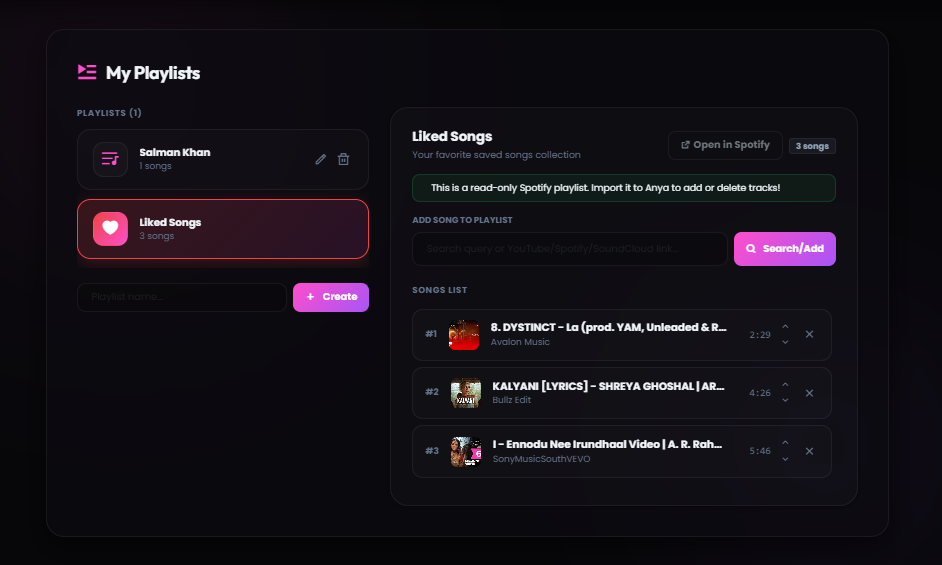
डैशबोर्ड क्लाउड सिंक में अपने पर्सनलाइज़्ड म्यूज़िकल क्यू ट्रैक्स को बनाएं, सेव करें और मैनेज करें।
आपके डेटाबेस ट्रैक्स पैरामीटर या पोजीशन खोए बिना अलग-अलग पब्लिक सर्वर क्लस्टर्स में आपका अनुसरण करते हैं।
स्मार्ट ऑडियो बफ़र एल्गोरिदम स्मूथ साउंड डिलीवरी के लिए रीजनल सर्वर ड्रॉप्स को बायपास करते हैं।
वॉइस चैनल स्टैगर होने पर अप्रत्याशित फ्रेम कट को रोकने के लिए डायनामिक रूप से स्मार्ट पैकेट रीबिल्डिंग रैपर तैनात करता है।
बिना टेक्स्ट फ़ॉर्मेटिंग कॉन्फ्लिक्ट के शेयर किए गए वेब प्रोफ़ाइल लिंक, एल्बम, ट्रैक या आर्टिस्ट कंपिलेशन पेज को पार्स करें।
डायनामिक सुरक्षित टोकन को 240ms से कम समय में हाई फिडेलिटी खोज पैरामीटर में अनुवादित करता है।
SoundCloud, Bandcamp, रॉ अटैचमेंट और कई डिजिटल इंजनों से मूल रूप से स्ट्रीम करें।
एक मजबूत डिकोडिंग लाइब्रेरी क्लाउड प्लेटफॉर्म पर सुरक्षित रूप से डेटा पढ़ती है और तुरंत ऑडियो पहुंचाती है।
इंटेलिजेंट कैशिंग कमांड रिस्पॉन्स और म्यूज़िक प्लेबैक को लगभग शून्य लोडिंग समय के साथ तेज़ करता है।
अन्या बार-बार एक्सेस किए जाने वाले डेटा को प्री-लोड करती है, जिससे लेटेंसी 60% तक कम हो जाती है।
पैरामीटर, कस्टम प्लेयर बटन लेआउट, एम्बेडिंग रंग टेम्पलेट सीधे डैशबोर्ड टॉगल के माध्यम से नियंत्रित करें।
स्किन लेयर्स, मॉड्यूल कंट्रोल और अनुमति कॉन्फ़िगरेशन को सर्वर शैलियों के साथ आसानी से स्विच करें।
A clean, simple breakdown of how Anya delivers high-quality music to your Discord server.
Save your favorite songs in custom playlists so you can play them anytime.
What it is: A simple way to save your music queues to your account. Instead of losing your song list when the bot leaves the channel, you can load your saved playlists instantly.
How to use: You can create and edit playlists directly through our web dashboard or by using Discord commands. Free users can save up to 100 songs in their playlist.
Anya automatically prevents stuttering and lag, even if Discord's servers are slow.
What it is: Our playback system keeps a small buffer of the song loaded ahead of time. If your Discord server connection drops momentarily, the music keeps playing without any gaps.
How to use: This is fully automatic. You do not need to configure anything. The bot monitors connection quality in real-time to keep your audio clear.
Simply paste Spotify track, album, or playlist links, and Anya will play them instantly.
What it is: Anya reads the song names from your Spotify links and matches them with high-quality audio streams. This happens in less than a second.
How to use: Copy a Spotify URL and use the /play command in Discord. Playlists with up to 100 tracks will load smoothly and play in order.
Stream music from SoundCloud, Bandcamp, or by uploading audio files directly to Discord.
What it is: Anya supports playing music from platforms other than YouTube. You can even upload an mp3 or wav file directly in Discord, and the bot will play it.
How to use: Paste any SoundCloud link or drag-and-drop an audio file into the Discord chat when using the play command.
Anya remembers popular songs to load and start playing them almost instantly.
What it is: To avoid searching for the same popular tracks repeatedly, Anya stores secure links to frequently played songs. This reduces loading times by more than half.
How to use: The next time you request a trending song, it will start playing in less than half a second.
Customize how the bot works in your server using a clean dashboard.
What it is: A web-based control panel where you can toggle bot features, change embed colors, and configure who is allowed to control the music.
How to use: Log in with your Discord account, select your server, and customize settings using simple buttons and sliders.
शून्य से संगीत तक 60 सेकंड से भी कम समय में।
जोड़ें बटन पर क्लिक करें, अपना सर्वर चुनें और आवश्यक अनुमतियां दें।
डैशबोर्ड से ग्रीटिंग संदेश, संगीत चैनल और XP पुरस्कार सेट करें।
आराम से बैठें क्योंकि अन्या संगीत, मॉडरेशन और जुड़ाव का ध्यान रखती है।
उत्पादन वातावरण में शीर्ष गिल्ड मालिकों से वास्तविक संरचनात्मक प्रतिक्रिया।
“अन्या के प्रीमियम नोड्स कभी भी बिटरेट कम नहीं करते हैं। स्वचालित प्लेलिस्ट सेटअप ने हमारी ऑनबोर्डिंग शैली को पूरी तरह से बदल दिया।”
“कंट्रोल डैशबोर्ड लेआउट अत्यंत तेज़ और अनुकूल है। Spotify इंटीग्रेशन सेट करने में कुछ ही सेकंड लगे।”
“स्मार्ट कैश इंजन अविश्वसनीय है। कमांड तुरंत काम करते हैं और संगीत पलक झपकते ही शुरू हो जाता है।”
आपके समुदाय के लिए उच्च बिटरेट ऑडियो, प्राथमिकता सहायता, कस्टम ब्रांडिंग और विशेष सुविधाएं।
महत्वपूर्ण विकास पैच नोट्स और संगीत बुनियादी ढांचे के अपग्रेड के साथ अपडेट रहें।
अन्या दो करीबी दोस्तों के बीच एक निजी परियोजना के रूप में शुरू हुई ताकि वे बिना किसी रुकावट के वॉयस चैनलों में एक साथ गाने सुन सकें।
पूरा ब्लॉग पढ़ें
जानिए कैसे अन्या पब्लिक हुई, हमारे पहले 75 सर्वरों के पीछे की कहानी, डिस्कॉर्ड द्वारा सत्यापित होना और सपने को जीवित रखने वाली छोटी टीम।
पूरा ब्लॉग पढ़ें
भारत में डेवलपर सत्यापन को नेविगेट करने, पहचान सत्यापन बाधाओं से निपटने और गेटवे इंटेंट्स के लिए लड़ने के पीछे की कहानी।
पूरा ब्लॉग पढ़ेंआपके सर्वर पर अन्या द्वारा लाए जाने वाले 100+ कमांड में से कुछ।
आपके सभी पसंदीदा स्रोतों से सहज उच्च-गुणवत्ता प्लेबैक। कोई कॉन्फ़िगरेशन आवश्यक नहीं है।
अन्या समर्पित उच्च-क्षमता वाले सर्वर नोड्स चलाती है जो शून्य प्लेबैक हकलाना, कस्टम स्वचालित ग्रीटिंग पैरामीटर और रीयल-टाइम ऑडियो सुरक्षा सुनिश्चित करते हैं।
सिस्टम में प्री-लोडेड स्पीड संशोधक, नाइटकोर त्वरण मैट्रिक्स, डीप बास प्रवर्धन और इमर्सिव रीवरब पैरामीटर शामिल हैं।
Click the 'Add to Discord' button at the top of this page. You need the 'Manage Server' permission on the server you want to invite the bot to.
Yes, Anya offers a free tier with essential features like music playback and basic queue management. Premium unlocks advanced audio filters, custom playlists, no-prefix mode, and 400% volume boost starting at just $3/month.
Anya supports streaming from Spotify, YouTube, SoundCloud, Bandcamp, and direct audio URLs. Simply paste a link or search by song name and the bot handles the rest.
Absolutely! Anya supports shared listening — anyone in your server can request songs, view the queue, and control playback. Premium users can also set custom DJ roles for finer access control.
Yes, we only store essential settings like your user ID, saved playlists, and server preferences. No personal information or voice activity is ever recorded or shared.
If you experience any issues, join our official Discord Support Server using the link at the bottom of the page. Our support staff is available 24/7 to help you troubleshoot.
You can set a custom prefix directly on the web dashboard panel under 'Server Settings', or use the `/config prefix` command in your server.
Yes! Anya supports YouTube links, SoundCloud, Bandcamp, and raw attachment files. Apple Music links are also resolved similarly to Spotify.
You can apply filters using slash commands like `/filter bassboost` or `/filter nightcore`. You can also click the filters dropdown menu directly on the Now Playing embed card.
There are no hardware requirements on your end. Our Custom Bot tier is fully hosted on our high-capacity server nodes and configured via panel.anyabot.pro.
Navigate to the web dashboard panel, select your server, and set a specific role as the DJ role. Only users with this role will be able to skip or modify music settings.
We support major credit/debit cards, UPI, and local wallets processed securely through Razorpay.
Yes, you can manage and reassign your active Premium slots to any server you own via the 'Profile' section on the web dashboard.
By default, the bot leaves the channel when the queue ends to save resources. If you want it to stay permanently, enable 24/7 mode using `/247`.
Use the `/volume` command, or select your server on the dashboard and set the 'Default Playback Volume' slider to your preferred level.
When autoplay is active, Anya automatically queries Last.fm to find and play similar songs when your queue runs empty, keeping the music playing continuously.
Free users can queue up to 100 songs at a time. Premium users enjoy an unlimited queue size for long listening sessions.
Type the `/lyrics` command in your Discord channel, and Anya will search and return the full lyrics of the currently playing track.
Yes, Anya is fully optimized for Discord's slash commands system. Type `/` in your chat box to view the full list of available music and utility commands.
Check if the bot's region matches your voice channel, or try changing the Discord voice channel region. You can also re-join the channel to establish a fresh connection.
In the web dashboard under your server settings, click the reset options to wipe custom prefixes, language selections, and player preferences.
Each server can host one instance of the main Anya bot. If you need multiple music bots playing in different voice channels simultaneously, check out our Custom Bot plans.
You can cancel or manage your subscriptions at any time via the billing area in the dashboard under your Profile settings.
The developers and community managers keeping the music playing.

Developer Spidey handles the core voice connections, bot logic, and system architecture to keep music lag-free.

Charuu oversees operations, server management, and coordinates updates to ensure high quality.

The Manager operates behind the scenes, ensuring infrastructure support and community growth.
Get support, suggest features, get early access to updates, and connect with thousands of Anya users worldwide.
Join Our Server