


Anya bắt đầu như một dự án riêng tư giữa hai người bạn thân để họ có thể cùng nhau nghe nhạc trong các kênh thoại mà không bị gián đoạn.
Read Full Log

Experience raw high-fidelity node streaming matched with ultra-responsive server onboarding rules. Beautiful system logging parameters built directly into one central platform.
High-capacity public networks process audio safely. List automatically switches every 3 seconds seamlessly.
Explore robust architectural functions configured for your community needs.
Build, save and manage your personalized musical queue tracks natively inside the dashboard cloud sync.
Your database tracks instantly follow you across different public server clusters without losing parameters or positions.
Smart audio buffer algorithms bypass high regional server drops to safeguard smooth sound delivery loops.
Deploys smart packet rebuilding wrappers dynamically to prevent unexpected frame cuts when voice channels stagger.
Directly parse shared web profile links, albums, tracks or artist compilation pages without text formatting conflicts.
Translates dynamic secure tokens seamlessly into high fidelity search metrics in less than 240ms flat.
Stream effortlessly from SoundCloud, Bandcamp, raw attachments, and multiple digital engines natively.
A robust decoding library reads raw structures safely across cloud platforms, feeding fluid audio payloads instantly.
Intelligent caching accelerates command responses and music playback with near-zero loading times.
Anya pre-loads frequently accessed data, reducing latency by up to 60% for split-second responsiveness.
Control parameters, custom player buttons layout, embedding color templates directly via dashboard toggles.
Switch skin layers, modular controls, permissions configuration matrices matching server styles fluidly.
A clean, simple breakdown of how Anya delivers high-quality music to your Discord server.
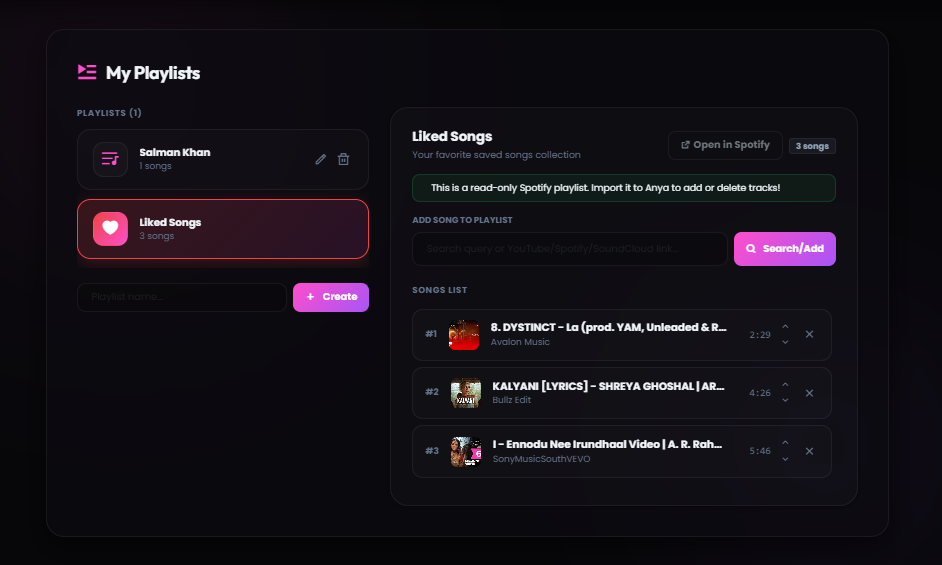
Save your favorite songs in custom playlists so you can play them anytime.
What it is: A simple way to save your music queues to your account. Instead of losing your song list when the bot leaves the channel, you can load your saved playlists instantly.
How to use: You can create and edit playlists directly through our web dashboard or by using Discord commands. Free users can save up to 100 songs in their playlist.
Anya automatically prevents stuttering and lag, even if Discord's servers are slow.
What it is: Our playback system keeps a small buffer of the song loaded ahead of time. If your Discord server connection drops momentarily, the music keeps playing without any gaps.
How to use: This is fully automatic. You do not need to configure anything. The bot monitors connection quality in real-time to keep your audio clear.
Simply paste Spotify track, album, or playlist links, and Anya will play them instantly.
What it is: Anya reads the song names from your Spotify links and matches them with high-quality audio streams. This happens in less than a second.
How to use: Copy a Spotify URL and use the /play command in Discord. Playlists with up to 100 tracks will load smoothly and play in order.
Stream music from SoundCloud, Bandcamp, or by uploading audio files directly to Discord.
What it is: Anya supports playing music from platforms other than YouTube. You can even upload an mp3 or wav file directly in Discord, and the bot will play it.
How to use: Paste any SoundCloud link or drag-and-drop an audio file into the Discord chat when using the play command.
Anya remembers popular songs to load and start playing them almost instantly.
What it is: To avoid searching for the same popular tracks repeatedly, Anya stores secure links to frequently played songs. This reduces loading times by more than half.
How to use: The next time you request a trending song, it will start playing in less than half a second.
Customize how the bot works in your server using a clean dashboard.
What it is: A web-based control panel where you can toggle bot features, change embed colors, and configure who is allowed to control the music.
How to use: Log in with your Discord account, select your server, and customize settings using simple buttons and sliders.
From zero to music in under 60 seconds.
Click the add button, pick your server, and grant the required permissions.
Set up greeting messages, music channels, and XP rewards from the dashboard.
Sit back as Anya takes care of music, moderation, and engagement.
Real structural feedback from top guild owners in production environments.
“Anya's premium nodes never drop bitrates. The automated playlists setup completely changed our onboarding style.”
“The control dashboard layout is extremely fast and friendly. Setting up Spotify integration took seconds flat.”
“The smart cache engine is absolutely incredible. Commands fire instantly and music starts before I can even blink.”
Higher bitrate audio, priority support, custom branding, and exclusive features for your community.
Stay updated with critical development patch notes and music infrastructure upgrades.
Anya bắt đầu như một dự án riêng tư giữa hai người bạn thân để họ có thể cùng nhau nghe nhạc trong các kênh thoại mà không bị gián đoạn.
Read Full Log
Khám phá cách Anya ra mắt công chúng, câu chuyện đằng sau 75 máy chủ đầu tiên của chúng tôi, được xác minh bởi Discord và đội ngũ nhỏ bé.
Read Full Log
Hậu trường của việc xác minh nhà phát triển tại Ấn Độ, giải quyết các trở ngại xác minh danh tính và đấu tranh cho Gateway Intents.
Read Full LogJust a few of the 100+ commands Anya brings to your server.
Seamless high-fidelity playback from all your favorite sources. No configuration needed.
Anya runs dedicated high-capacity server nodes ensuring near-zero playback stutter, custom automated greeting parameters, and real-time audio protection setup.
The system features pre-loaded speed modifiers, nightcore acceleration matrices, deep low-end bass amplification, and immersive reverb parameters.
Click the 'Add to Discord' button at the top of this page. You need the 'Manage Server' permission on the server you want to invite the bot to.
Yes, Anya offers a free tier with essential features like music playback and basic queue management. Premium unlocks advanced audio filters, custom playlists, no-prefix mode, and 400% volume boost starting at just $3/month.
Anya supports streaming from Spotify, YouTube, SoundCloud, Bandcamp, and direct audio URLs. Simply paste a link or search by song name and the bot handles the rest.
Absolutely! Anya supports shared listening — anyone in your server can request songs, view the queue, and control playback. Premium users can also set custom DJ roles for finer access control.
Yes, we only store essential settings like your user ID, saved playlists, and server preferences. No personal information or voice activity is ever recorded or shared.
If you experience any issues, join our official Discord Support Server using the link at the bottom of the page. Our support staff is available 24/7 to help you troubleshoot.
You can set a custom prefix directly on the web dashboard panel under 'Server Settings', or use the `/config prefix` command in your server.
Yes! Anya supports YouTube links, SoundCloud, Bandcamp, and raw attachment files. Apple Music links are also resolved similarly to Spotify.
You can apply filters using slash commands like `/filter bassboost` or `/filter nightcore`. You can also click the filters dropdown menu directly on the Now Playing embed card.
There are no hardware requirements on your end. Our Custom Bot tier is fully hosted on our high-capacity server nodes and configured via panel.anyabot.pro.
Navigate to the web dashboard panel, select your server, and set a specific role as the DJ role. Only users with this role will be able to skip or modify music settings.
We support major credit/debit cards, UPI, and local wallets processed securely through Razorpay.
Yes, you can manage and reassign your active Premium slots to any server you own via the 'Profile' section on the web dashboard.
By default, the bot leaves the channel when the queue ends to save resources. If you want it to stay permanently, enable 24/7 mode using `/247`.
Use the `/volume` command, or select your server on the dashboard and set the 'Default Playback Volume' slider to your preferred level.
When autoplay is active, Anya automatically queries Last.fm to find and play similar songs when your queue runs empty, keeping the music playing continuously.
Free users can queue up to 100 songs at a time. Premium users enjoy an unlimited queue size for long listening sessions.
Type the `/lyrics` command in your Discord channel, and Anya will search and return the full lyrics of the currently playing track.
Yes, Anya is fully optimized for Discord's slash commands system. Type `/` in your chat box to view the full list of available music and utility commands.
Check if the bot's region matches your voice channel, or try changing the Discord voice channel region. You can also re-join the channel to establish a fresh connection.
In the web dashboard under your server settings, click the reset options to wipe custom prefixes, language selections, and player preferences.
Each server can host one instance of the main Anya bot. If you need multiple music bots playing in different voice channels simultaneously, check out our Custom Bot plans.
You can cancel or manage your subscriptions at any time via the billing area in the dashboard under your Profile settings.
The developers and community managers keeping the music playing.

Developer Spidey handles the core voice connections, bot logic, and system architecture to keep music lag-free.

Charuu oversees operations, server management, and coordinates updates to ensure high quality.

The Manager operates behind the scenes, ensuring infrastructure support and community growth.
Get support, suggest features, get early access to updates, and connect with thousands of Anya users worldwide.
Join Our Server